Ever tried to delete / move / rename a file , but Windows refuses, saying the file is already used by another program ...
In order to find this f$@@%! other file that prevent you to handle this file, you can use ProcessExplorer
Press on Find / Find Handle or DLL
write the name of your file
Credits goes to
http://superuser.com/questions/399659/how-can-i-identify-what-application-is-using-a-given-file
Thursday, June 18, 2015
Thursday, March 12, 2015
Network Connection
In order to understand the spec of the network card being used by your server:
Here, as example of the status on my job's cloud :
In addition, in order to understand the SWAP memory usage :
free -g
==> Means that the OS has about 67+15 GB available
If you don't want to use swap (it may slow your server/application etc)
lspci | grep -i net
Here, as example of the status on my job's cloud :
ro -a -o . -h els2 -s shared -irc %/ lspci | grep -i net
[ virginia / svpr-els204 ] - 03:00.0 Ethernet controller: Broadcom Corporation NetXtreme BCM5719 Gigabit Ethernet PCIe (rev 01) <<== which means 1 GB only
[ virginia / svpr-els204 ] - 03:00.1 Ethernet controller: Broadcom Corporation NetXtreme BCM5719 Gigabit Ethernet PCIe (rev 01)
[ virginia / svpr-els204 ] - 03:00.2 Ethernet controller: Broadcom Corporation NetXtreme BCM5719 Gigabit Ethernet PCIe (rev 01)
[ virginia / svpr-els204 ] - 03:00.3 Ethernet controller: Broadcom Corporation NetXtreme BCM5719 Gigabit Ethernet PCIe (rev 01)
[ virginia / svpr-els205 ] - 03:00.0 Ethernet controller: Broadcom Corporation NetXtreme BCM5719 Gigabit Ethernet PCIe (rev 01)
[ virginia / svpr-els205 ] - 03:00.1 Ethernet controller: Broadcom Corporation NetXtreme BCM5719 Gigabit Ethernet PCIe (rev 01)
[ virginia / svpr-els205 ] - 03:00.2 Ethernet controller: Broadcom Corporation NetXtreme BCM5719 Gigabit Ethernet PCIe (rev 01)
[ virginia / svpr-els205 ] - 03:00.3 Ethernet controller: Broadcom Corporation NetXtreme BCM5719 Gigabit Ethernet PCIe (rev 01)
[ virginia / svpr-els206 ] - 03:00.0 Ethernet controller: Broadcom Corporation NetXtreme BCM5719 Gigabit Ethernet PCIe (rev 01)
[ virginia / svpr-els206 ] - 03:00.1 Ethernet controller: Broadcom Corporation NetXtreme BCM5719 Gigabit Ethernet PCIe (rev 01)
[ virginia / svpr-els206 ] - 03:00.2 Ethernet controller: Broadcom Corporation NetXtreme BCM5719 Gigabit Ethernet PCIe (rev 01)
[ virginia / svpr-els206 ] - 03:00.3 Ethernet controller: Broadcom Corporation NetXtreme BCM5719 Gigabit Ethernet PCIe (rev 01)
[ virginia / svpr-els207 ] - 04:00.0 Ethernet controller: Emulex Corporation OneConnect 10Gb NIC (be3) (rev 01) <<== this means the card is 10Gb/sec
[ virginia / svpr-els207 ] - 04:00.1 Ethernet controller: Emulex Corporation OneConnect 10Gb NIC (be3) (rev 01)
[ virginia / svpr-els208 ] - 04:00.0 Ethernet controller: Emulex Corporation OneConnect 10Gb NIC (be3) (rev 01)
[ virginia / svpr-els208 ] - 04:00.1 Ethernet controller: Emulex Corporation OneConnect 10Gb NIC (be3) (rev 01)
[ virginia / svpr-els209 ] - 04:00.0 Ethernet controller: Emulex Corporation OneConnect 10Gb NIC (be3) (rev 01)
[ virginia / svpr-els209 ] - 04:00.1 Ethernet controller: Emulex Corporation OneConnect 10Gb NIC (be3) (rev 01)
[ virginia / svpr-els21 ] - 04:00.0 Ethernet controller: Emulex Corporation OneConnect 10Gb NIC (be3) (rev 01)
[ virginia / svpr-els21 ] - 04:00.1 Ethernet controller: Emulex Corporation OneConnect 10Gb NIC (be3) (rev 01)
[ virginia / svpr-els210 ] - 04:00.0 Ethernet controller: Emulex Corporation OneConnect 10Gb NIC (be3) (rev 01)
[ virginia / svpr-els210 ] - 04:00.1 Ethernet controller: Emulex Corporation OneConnect 10Gb NIC (be3) (rev 01)
[ virginia / svpr-els211 ] - 04:00.0 Ethernet controller: Emulex Corporation OneConnect 10Gb NIC (be3) (rev 01)
[ virginia / svpr-els211 ] - 04:00.1 Ethernet controller: Emulex Corporation OneConnect 10Gb NIC (be3) (rev 01)
[ virginia / svpr-els212 ] - 04:00.0 Ethernet controller: Emulex Corporation OneConnect 10Gb NIC (be3) (rev 01)
[ virginia / svpr-els212 ] - 04:00.1 Ethernet controller: Emulex Corporation OneConnect 10Gb NIC (be3) (rev 01)
[ virginia / svpr-els22 ] - 04:00.0 Ethernet controller: Emulex Corporation OneConnect 10Gb NIC (be3) (rev 01)
[ virginia / svpr-els22 ] - 04:00.1 Ethernet controller: Emulex Corporation OneConnect 10Gb NIC (be3) (rev 01)
In addition, in order to understand the SWAP memory usage :
free -g
free -g total used free shared buffers cachedMem: 125 110 15 0 3 67-/+ buffers/cache: 39 86Swap: 128 0 128
==> Means that the OS has about 67+15 GB available
If you don't want to use swap (it may slow your server/application etc)
- swapoff -a ==> do never use swap
- sysctl vm.swappiness=0 ==> use swap only if you don't have any more choice
- sysctl vm.swappiness=60 ==> use swap only if you reach more than 60% of the memory
- swapon -a ==> enable usage of SWAP, according to the swappiness value
- sysctl -a |grep swap : to understand what is the % policy value.
Using top, you can have the following:
Mem: 132119828k total, 131341592k used, 778236k free, 3505520k buffers
Swap: 134365176k total, 88752k used, 134276424k free, 105451036k cached <<== this is the FULL RAM available
More info regarding swap can be found:
http://askubuntu.com/questions/103915/how-do-i-configure-swappinessTuesday, February 24, 2015
How to characterize stength of a server
In order to understand your server, what is its strenght, its OS version, how many cpu, here is a short list of commands that may help
free -m
total used free shared buffers cached
Mem: 3832 3605 226 0 375 1038
-/+ buffers/cache: 2192 1640
Swap: 4031 126 3905
In this case, we can see the server has about 4GB RAM .
top (and then click on 1)
top - 18:26:24 up 169 days, 7:07, 3 users, load average: 0.03, 0.08, 0.08
Tasks: 133 total, 1 running, 130 sleeping, 0 stopped, 2 zombie
Cpu0 : 2.9%us, 0.7%sy, 0.0%ni, 95.9%id, 0.5%wa, 0.0%hi, 0.0%si, 0.0%st
Cpu1 : 1.4%us, 0.5%sy, 0.0%ni, 97.5%id, 0.6%wa, 0.0%hi, 0.0%si, 0.0%st
Mem: 3924684k total, 3658548k used, 266136k free, 380324k buffers
Swap: 4128760k total, 130752k used, 3998008k free, 1035372k cached
Here, we can see that we have 2 CPU (2 core) and still about 4 GB RAM
df -h
Filesystem Size Used Avail Use% Mounted on
/dev/mapper/vg_root-lv_root
20G 5.1G 14G 27% /
tmpfs 1.9G 0 1.9G 0% /dev/shm
/dev/sda1 146M 60M 79M 44% /boot
/dev/mapper/vg_root-lv_home
4.0G 137M 3.7G 4% /home
/dev/mapper/vg_root-lv_liveperson
28G 987M 26G 4% /liveperson
/dev/mapper/vg_root-lv_tmp
4.0G 143M 3.6G 4% /tmp
This command enables to understand the disk partition ... How many storage you have etc ,,,
cat /etc/issue
CentOS release 6.6 (Final)
Kernel \r on an \m
This last command shows you which OS you run on and what is its version.
Here, we use CentOS version 6.6 release.
free -m
total used free shared buffers cached
Mem: 3832 3605 226 0 375 1038
-/+ buffers/cache: 2192 1640
Swap: 4031 126 3905
In this case, we can see the server has about 4GB RAM .
top (and then click on 1)
top - 18:26:24 up 169 days, 7:07, 3 users, load average: 0.03, 0.08, 0.08
Tasks: 133 total, 1 running, 130 sleeping, 0 stopped, 2 zombie
Cpu0 : 2.9%us, 0.7%sy, 0.0%ni, 95.9%id, 0.5%wa, 0.0%hi, 0.0%si, 0.0%st
Cpu1 : 1.4%us, 0.5%sy, 0.0%ni, 97.5%id, 0.6%wa, 0.0%hi, 0.0%si, 0.0%st
Mem: 3924684k total, 3658548k used, 266136k free, 380324k buffers
Swap: 4128760k total, 130752k used, 3998008k free, 1035372k cached
Here, we can see that we have 2 CPU (2 core) and still about 4 GB RAM
df -h
Filesystem Size Used Avail Use% Mounted on
/dev/mapper/vg_root-lv_root
20G 5.1G 14G 27% /
tmpfs 1.9G 0 1.9G 0% /dev/shm
/dev/sda1 146M 60M 79M 44% /boot
/dev/mapper/vg_root-lv_home
4.0G 137M 3.7G 4% /home
/dev/mapper/vg_root-lv_liveperson
28G 987M 26G 4% /liveperson
/dev/mapper/vg_root-lv_tmp
4.0G 143M 3.6G 4% /tmp
This command enables to understand the disk partition ... How many storage you have etc ,,,
cat /etc/issue
CentOS release 6.6 (Final)
Kernel \r on an \m
This last command shows you which OS you run on and what is its version.
Here, we use CentOS version 6.6 release.
Tuesday, October 7, 2014
Json very nice tool
Given by Greg
http://www.jsonschema2pojo. org/
Enable to visualize how will look the generated java POJO code by giving its json schema representation.
For ex:
Assuming the following Json schema:
You'll obtain the following JAVA POJO class:
Very nice tool !
Enable to visualize how will look the generated java POJO code by giving its json schema representation.
For ex:
Assuming the following Json schema:
{
"type":"object",
"properties": {
"foo": {
"type": "string"
},
"bar": {
"type": "integer"
},
"baz": {
"type": "boolean"
}
}
}
You'll obtain the following JAVA POJO class:
-----------------------------------com.example.Example.java-----------------------------------
package com.example;
import java.util.HashMap;
import java.util.Map;
import javax.annotation.Generated;
import com.fasterxml.jackson.annotation.JsonAnyGetter;
import com.fasterxml.jackson.annotation.JsonAnySetter;
import com.fasterxml.jackson.annotation.JsonIgnore;
import com.fasterxml.jackson.annotation.JsonInclude;
import com.fasterxml.jackson.annotation.JsonProperty;
import com.fasterxml.jackson.annotation.JsonPropertyOrder;
@JsonInclude(JsonInclude.Include.NON_NULL)
@Generated("org.jsonschema2pojo")
@JsonPropertyOrder({
"foo",
"bar",
"baz"
})
public class Example {
@JsonProperty("foo")
private String foo;
@JsonProperty("bar")
private Integer bar;
@JsonProperty("baz")
private Boolean baz;
@JsonIgnore
private Map<String, Object> additionalProperties = new HashMap<String, Object>();
@JsonProperty("foo")
public String getFoo() {
return foo;
}
@JsonProperty("foo")
public void setFoo(String foo) {
this.foo = foo;
}
@JsonProperty("bar")
public Integer getBar() {
return bar;
}
@JsonProperty("bar")
public void setBar(Integer bar) {
this.bar = bar;
}
@JsonProperty("baz")
public Boolean getBaz() {
return baz;
}
@JsonProperty("baz")
public void setBaz(Boolean baz) {
this.baz = baz;
}
@JsonAnyGetter
public Map<String, Object> getAdditionalProperties() {
return this.additionalProperties;
}
@JsonAnySetter
public void setAdditionalProperty(String name, Object value) {
this.additionalProperties.put(name, value);
}
}
Sunday, June 15, 2014
Working Environment 2014
Here's a list of the tools that I want to see on any dev computer (windows 7 enterprise) I'm working with.
Ditto - clipboard manager http://ditto-cp.sourceforge.net/
ArsClip - clipboard manager better than Ditto (which has a high-cpu bug) http://www.joejoesoft.com/vcms/97/
Cygwin
Console - for emulating both cygwin and DOS - http://sourceforge.net/projects/console/
Xemacs - editor
WinMerge - file comparison
JDK - java of course
Maven (modify the setting to your needs)
IDE (Idea / Eclipse )
WinRar - unzip / uncompress tool
mRemoteNG - for ssh http://www.mremoteng.org/
Unlocker - for finding process that "handles" a file
Launchy - windows app launcher (like Executor / SlickRun ) - http://www.launchy.net/download.php#windows - or maybe the winner is executor . unclear
KeePass - password manager http://keepass.info/
GoogleDrive
Google Music
Tortoise (SVN )
SlikSVN - for SVN binary as well - http://www.sliksvn.com/en/download
Process Explorer
Apache Directory Studio
to be continued ...
Ditto - clipboard manager http://ditto-cp.sourceforge.net/
ArsClip - clipboard manager better than Ditto (which has a high-cpu bug) http://www.joejoesoft.com/vcms/97/
Cygwin
Console - for emulating both cygwin and DOS - http://sourceforge.net/projects/console/
Xemacs - editor
WinMerge - file comparison
JDK - java of course
Maven (modify the setting to your needs)
IDE (Idea / Eclipse )
WinRar - unzip / uncompress tool
mRemoteNG - for ssh http://www.mremoteng.org/
Unlocker - for finding process that "handles" a file
Launchy - windows app launcher (like Executor / SlickRun ) - http://www.launchy.net/download.php#windows - or maybe the winner is executor . unclear
KeePass - password manager http://keepass.info/
GoogleDrive
Google Music
Tortoise (SVN )
SlikSVN - for SVN binary as well - http://www.sliksvn.com/en/download
Process Explorer
Apache Directory Studio
to be continued ...
Monday, June 2, 2014
vi macro - tip
I always wanted to know that: macro on vi ...
http://vim.wikia.com/wiki/Macros
Instructions: To enter a macro, type:
Then, for re-executing the macro :
http://vim.wikia.com/wiki/Macros
Instructions: To enter a macro, type:
q<letter><commands>q
To execute the macro <number> times (once by default), type:
<number>@<letter>
Example: So, the complete process looks like:
qd | start recording to register d |
... | your complex series of commands |
q | stop recording |
@d | execute your macro |
@@ | execute your macro again |
Tuesday, May 20, 2014
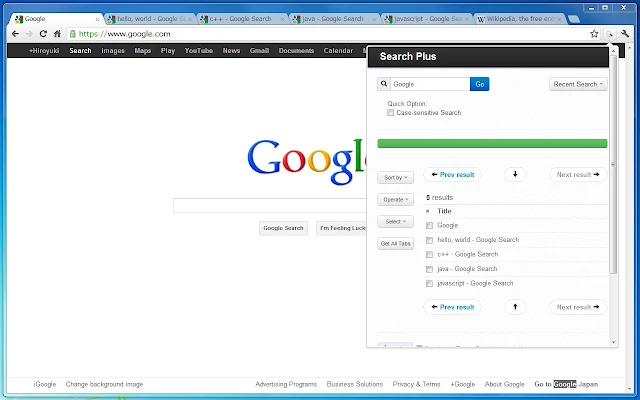
Search in all your opened tabs
I've discovered this chrome extension. Should be very useful:
https://chrome.google.com/webstore/detail/search-plus/cdpohbejnbclggljmoijjcpdhbaaijfm
The Search Plus can find the tabs you're looking for from all opened tabs.
// What is this? The Search Plus is a Chrome Extension App. It helps to find the tabs you're looking for from all opened tabs regardless of window, and you can manage the found tabs easily and quickly. // Features - Search tabs contains specific words - You can operate found tabs -- close tabs -- collect tabs into a single window - Insert text to the title of tabs - Inject code to the document of tabs - Capture images from tabs all at once - Language Supports: English, Japanese // ScreenCast
Subscribe to:
Posts (Atom)