Tuesday, May 20, 2014

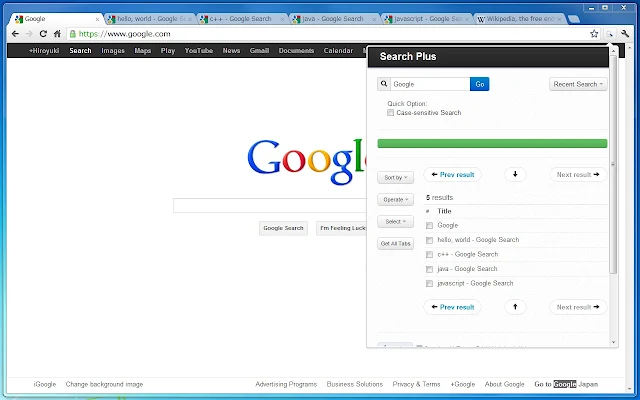
Search in all your opened tabs

I've discovered this chrome extension. Should be very useful:

https://chrome.google.com/webstore/detail/search-plus/cdpohbejnbclggljmoijjcpdhbaaijfm

The Search Plus can find the tabs you're looking for from all opened tabs.
// What is this?
The Search Plus is a Chrome Extension App.
It helps to find the tabs you're looking for from all opened tabs regardless of window, and you can manage the found tabs easily and quickly.

// Features
- Search tabs contains specific words
- You can operate found tabs
-- close tabs
-- collect tabs into a single window
- Insert text to the title of tabs
- Inject code to the document of tabs
- Capture images from tabs all at once
- Language Supports: English, Japanese

// ScreenCast


Monday, April 28, 2014

RegEx tool

A RegEx online tool , highly recommended by Grigory R.

http://www.regexr.com/


As well, here's a quite good video tutorialto watch before using the tool : 


http://www.youtube.com/watch?v=fOH62XXGdLs#t=124


Wednesday, January 15, 2014

Remote debug unit test run by MAVEN

Once in a while, you have this unit test that run perfectly within your IDEA / Eclipse ide, but fails when executed by maven.

If it happens, you may want to debug your unit test when it fails.
In order to remote debug it , when executed by maven, you can do the following:

SureFire Method

You can achieve it in another way by adding -Dmaven.surefire.debug to your mvn command. the debug port is 5005.
If you need to cancel the the fork of your surefire plugin , add -DforkCount=0.

All is explained nicely in: Maven Surefire Plugin - Debugging Tests

Thanks to GuyH for the tip. Didn't try it yet but it should work.

My old fashion method

Add the "remote debug" JVM argument to your maven execution:

-Xdebug -Xrunjdwp:transport=dt_socket,server=y,suspend=n,address=1044


In addition, In addition, be sure that your maven surefire-plugin, responsible of running your unit test, doesn't execute your unit test(s) in fork mode but within its own jvm, so you can add breakpoint on the unit test itself. 

         <plugin>                <groupId>org.apache.maven.plugins</groupId>                <artifactId>maven-surefire-plugin</artifactId>                                <configuration>                                        <forkMode>always</forkMode>        <<== this must be deleted or on false                                </configuration>                <inherited>true</inherited>            </plugin>


Then, once your maven is running, attach your IDE tool (eclipse/idea or whatever) to your JVM (here, in our above example, attach it to port 1044, on the host where your maven is running) 

If maven is running too quickly, you can use the suspend mode (suspend=y) , so your maven JVM when start until you attach your IDE to it:

-Xdebug -Xrunjdwp:transport=dt_socket,server=y,suspend=y,address=1044


Sunday, January 5, 2014

Call jmx using simple script instead of jconsole

There’s option to call for jmx bean (attribute/operations) using the console only , without opening any jconsole.
Download the jmxterm open source
Then, type something like:

java -jar jmxterm-1.0-alpha-4-uber.jar java --url localhost:10099 -i script/getServiceStatus.txt

where the scripts/getServiceStatus.txt file is something like:

domain LpTag
bean LpTag:name=ServiceStatusManage
get ServiceStatus


My original post in nation (@liveperson )


jmxterm - a JMX tool using command line

Posted by Michael Zamir in R&D Tech forum on Jan 13, 2014 8:37:00 AM
Hello all

I've discovered recently an helpful jar that enables to query/execute a remote jmx server from command line.
This utility is an open-source , called jmxterm .

It enables you to access directly a JMX server , to query it or to execute operations on it, without having to open a jconsole.
It can be useful for automation and for the keyboard lover, like me or simply to check whether your server (local server or remote QA/CI server is up and healthy)
I'm using it for quickly checking the service status of my server (here in the example) or to run some trivial operation (clear cache etc ...)

Jar can be found here: \\tlvfs\Files\jmx  (most of you have it mapped under your drive T:\jmx )
I've also create a very simple batch and shell script file for easing your first steps, if any ... 

In order to use use it (assuming you're a windows OS user, but same is feasible for linux) , simply run the jmxterm.bat (or jmxterm.sh ) script , which simply calls the jar :


Example : get service status of my service :

./jmxterm.bat --url localhost:10099 -i script/getServiceStatus.txt
Welcome to JMX terminal. Type "help" for available commands.
#domain is set to LpTag
#bean is set to LpTag:name=ServiceStatusManage
#mbean = LpTag:name=ServiceStatusManage:
ServiceStatus = 3 - Service is up;

where the script/getServiceStatus.txt file looks as following:
domain LpTag
bean LpTag:name=ServiceStatusManage
get ServiceStatus
since I wanted to obtain the following bean attribute/operation:


Another example is to enter into the command line itself and to navigate within the tool : for ex, connect your jmx (using open command), then query the domains (domains command) or beans (beans command) and execute different kind of operations ...

cd T:\jmx
jmxterm.bat

@@@@@@@@@@@@@@@@@@@@@@@@@@@@@@@@@@@@
jmxterm example of direct use:
jmxterm.bat --url localhost:10099 -i script/getServiceStatus.txt
jmxterm.bat -l service:jmx:rmi://Hc1k:9588/jndi/rmi://hc1k:10099/hcserv
@@@@@@@@@@@@@@@@@@@@@@@@@@@@@@@@@@@@
Welcome to JMX terminal. Type "help" for available commands.
$>help
#following commands are available to use:
about    - Display about page
bean     - Display or set current selected MBean.
beans    - List available beans under a domain or all domains
bye      - Terminate console and exit
close    - Close current JMX connection
domain   - Display or set current selected domain.
domains  - List all available domain names
exit     - Terminate console and exit
get      - Get value of MBean attribute(s)
help     - Display available commands or usage of a command
info     - Display detail information about an MBean
jvms     - List all running local JVM processes
open     - Open JMX session or display current connection
option   - Set options for command session
quit     - Terminate console and exit
run      - Invoke an MBean operation
set      - Set value of an MBean attribute

Configure your JVM to expose JMX: 
In order to configure your JVM to expose JMX , add the follow parameters to your JVM arguments:

-Dcom.sun.management.jmxremote 
-Dcom.sun.management.jmxremote.authenticate=false 
-Dcom.sun.management.jmxremote.ssl=false 
-Dcom.sun.management.jmxremote.port=10099
-Djava.rmi.server.hostname=myserver.example.com
The final rmi.server.hostname is used for exposing JMX to a specific domain (we can limit it).
Don't know currrently to add more info, but I remember there's another post about it. 
I've copied it from this link 
http://stackoverflow.com/questions/834581/remote-jmx-connection


Enjoy if you can ...

Monday, November 4, 2013

LogRotate in unix - Utility for rotation of files (i.e log files ) in unix

I've just learned that this utility exists in linux / unix

Logrotate is a great utility to manage and adminster log files in a system. It provides you with a lot of options, namely, automatic rotation, compression and mailing of log files. Each log file can be rotated hourly, daily, weekly or monthly. In this article, I will show you how to manage your log files using logrotate.

You can add your own configuration file like /etc/logrotate.d/LPapache which defines which files should be rotated.

Example of configuration file:

/etc/logrotate.d/LPapache
/liveperson/data/server_tomcat/logs/*txt /liveperson/data/server_tomcat/logs/*log /liveperson/data/server_tomcat/logs/catalina.out {
    copytruncate
    daily
    rotate 365
    missingok
    dateext
    sharedscripts
    compress
}


Another example /etc/logrotate.d/LPapache:
/liveperson/data/server_apache/logs/*log {
    rotate 365
    missingok
    size 500M
    dateext
    sharedscripts
    compress
    postrotate
        /sbin/service LPapache reload > /dev/null 2>/dev/null || true
    endscript
}

More info here
  http://linuxers.org/howto/howto-use-logrotate-manage-log-files  

Wednesday, June 5, 2013

Query RPM

Some RPM commands that I regularly use (and struggle to find their syntax)


In order to query which RPM is installed on your machine
rpm -qa |grep somthing

Query a specific RPM installed on your machine:
rpm -qil nameOfYouPackage

Same but for RPM that is not installed on your machine (
rpm -qpil  nameOfYouPackage.rpm

Erase an installed RPM
rpm -e NameOfYourPackage
Search for availability of a package in the yum repositories:
 yum list stingraymain


Some Yum commands en vrac
yum search YourYumPackage
yum install YourYumPackage
yum remove YourYumPackage
yum info  YourYumPackage


Wednesday, May 22, 2013

How to install officially certificate on your JDK


How to install officially certificate on your JDK 


On your page, click on the https icon (location bar, left side, generally)
Click on Certificate Information
Click on Details tab and then Copy To File

Then, run the following command  (adjust the cert file path and the JDK path on which you want to install the certificate)

keytool -import -file "C:/temp/certxxx.cer" -alias lptagsso -keystore "C:\Program Files\Java\jdk1.7.0_03\jre\lib\security/cacerts"

You're required to type the keytool password. By default, it is changeit